Choosing among today’s Remote Control Systems requires more than comparing prices, wireless ranges, or attractive product photographs. Buyers need to understand how each system performs in real conditions: behind concrete walls, across large facilities, or during unstable network traffic. A reliable solution should provide responsive commands, clear status feedback, secure access, and simple maintenance. It should also integrate with existing equipment without forcing an expensive redesign.
Thomas B. Sheridan, a leading authority on teleoperation and human-machine interaction, described the field this way: “Teleoperation is the extension of human sensing and manipulation capabilities to a remote environment.” That principle remains practical for buyers. A system is not truly effective if commands arrive late, alarms are difficult to interpret, or operators cannot confirm a machine’s physical response. Small delays matter. So does visibility.
This guide examines the top Remote Control Systems for buyers across industrial, commercial, home, and specialized applications. It considers control distance, communication stability, encryption, user permissions, feedback quality, installation effort, and long-term support. A lower-priced controller may appear attractive, but replacement batteries, proprietary software, and weak technical service can change its real cost. Buyers should test equipment in the environment where it will operate, not only on a showroom desk.
There is no perfect system.
Some recommendations may seem obvious, yet practical weaknesses deserve attention. A powerful platform can become frustrating when its interface feels crowded. A simple system can prove more dependable than a feature-heavy alternative. The best choice depends on the task, risk level, operating environment, and the people using it every day.
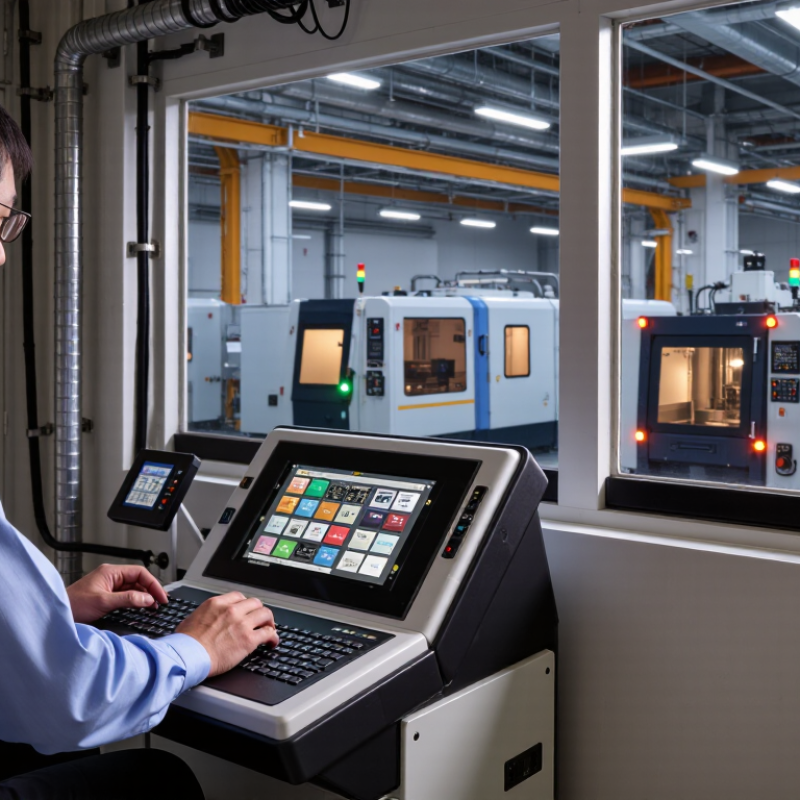
A remote control system lets an operator monitor and direct equipment from another location. It usually combines a control interface, communication network, sensors, software, and physical actuators. Sensors send temperature, position, speed, or fault data back to the operator. Commands then travel through a secure gateway to the machine.
Some systems use wired networks for stable, low-latency control. Others use cellular, radio, or private internet connections. The choice depends on distance, site conditions, and response time. A small delay may be acceptable for warehouse monitoring. It can become dangerous during precise industrial movement. Feedback matters.
The International Federation of Robotics reported 541,302 industrial robots were installed worldwide in 2023, a 10% annual increase. This growth shows why reliable control and monitoring infrastructure matters across modern facilities. NIST’s Cybersecurity Framework 2.0 also emphasizes governance, asset identification, protection, and continuous detection. Buyers should therefore examine access controls, audit logs, encrypted communication, and offline recovery options.
A practical test is essential. Measure command latency during peak network use, not only in demonstrations. Check whether operators can understand alarms without excessive screen switching. Redundant power and manual override features deserve attention. They are often overlooked.
No remote system is perfect. Even a fast connection can fail when sensors provide poor data. A cheaper platform may reduce initial costs, yet create expensive maintenance work later. Buyers should compare the complete operating process, not just the dashboard.
A reliable remote control system should match the equipment, worksite, and operator’s daily needs. Buyers should examine operating range, signal stability, and response time. A warehouse may need 100 meters of coverage, while a construction site may need more. Test the system near walls, metal structures, and moving machinery. Interference can appear during real operations. Battery life also matters. A controller that fails during a busy shift creates avoidable delays.
Tips: Compare emergency stop functions, access controls, and alert feedback before reviewing extra features. Choose controls with clear buttons and readable indicators. Gloves, rain, and poor lighting can change the user experience. Ask for maintenance records and independent safety documentation. Check whether replacement batteries and spare parts remain available. A low purchase price may hide higher service costs.
System compatibility deserves careful attention. Confirm voltage requirements, communication protocols, and installation space. Strong encryption helps protect commands from unauthorized access. However, security settings should remain practical for trained operators. Review software updates and diagnostic tools, too. These features can reduce troubleshooting time, although they may increase training needs. No system is perfect. I would request a live demonstration before approval, because polished specifications can miss uncomfortable field details. Feedback from actual operators often reveals problems engineers did not notice.
Remote control systems differ by range, signal strength, response time, and installation needs. The major types include infrared, radio frequency, Bluetooth, Wi-Fi, cellular, and industrial radio systems. Infrared controls work well with televisions and appliances in the same room. They need a clear path between the remote and receiver. Radio frequency controls travel through walls and suit gates, lighting, and equipment across larger spaces. Bluetooth systems offer short-range control through phones, often with simple pairing and low energy use.
Wi-Fi systems support control from different rooms or locations with internet access. They can also connect with sensors and automation platforms. Cellular systems work across wide areas, making them useful for remote machinery or property monitoring. Industrial radio systems prioritize durability, stable communication, and quick response in demanding environments. Field testing often reveals practical issues, such as delayed signals near thick concrete or crowded networks. No system performs perfectly everywhere.
Tips: Measure the real operating distance before buying. Check battery access and receiver placement. Test controls near walls, metal surfaces, and other wireless devices. Choose manual backup controls for essential equipment. I would not trust advertised range alone; real buildings often reduce it sharply. Keep a simple record of response time, signal drops, and maintenance needs during the first week.
Choosing a remote control system starts with risk, not convenience. For buyers, the strongest options combine dependable range, clear feedback, and fail-safe operation. A reliable system should stop equipment when the signal drops. Look for emergency-stop functions, encrypted communication, and clear battery warnings. Test the response beside the machine and from the farthest working position. In my installations, weak signals often appeared behind steel frames. That detail changed the receiver location. Short range can become a serious safety problem.
Compatibility deserves equal attention. Check voltage, relay type, operating frequency, load rating, and control logic before purchase. A transmitter may pair successfully yet send the wrong command. Match every function with the equipment manual. Adjustable channels can support cranes, gates, pumps, or lighting. Unused channels should remain disabled. This reduces accidental activation. Ask whether replacement transmitters require reprogramming. Documentation is more reliable than a salesperson’s promise.
Installation should include a site survey, labeled wiring, and controlled commissioning tests. Keep the receiver away from motors, large metal surfaces, and water exposure. Use sealed enclosures where dust or moisture is expected. Confirm grounding and protective devices with a qualified technician. I once treated a quick pairing test as sufficient; it was not. The system worked indoors but failed near a crowded loading area. A written test record would have exposed that weakness earlier. Train operators on range limits, battery checks, and manual fallback procedures.
What Are the Top Remote Control Systems for Buyers?
Choosing the right remote control system starts with your environment, not its feature list. A home setup may need simple scheduling and mobile access. Industrial equipment requires low latency, role-based permissions, emergency stops, and detailed activity logs. IoT Analytics estimated 18.8 billion connected IoT devices worldwide in 2024. That scale increases convenience, but it also increases configuration risks.
Security deserves equal attention. Verizon’s 2024 Data Breach Investigations Report recorded a 180% rise in vulnerability exploitation as an initial access method. Select systems with multi-factor authentication, encrypted communication, automatic updates, and separate user roles. NIST SP 800-63B also supports stronger, phishing-resistant authentication methods. Test the system during weak network conditions. A remote command that arrives late can create an unsafe result. Compatibility matters too. Confirm support for your current hardware, operating system, and network standards before purchasing. Cheap adapters often look practical. They may become expensive later.
Tips: Ask for a live demonstration before buying. Check response time from different locations. Review the update policy and service history. Keep a manual control option when remote access fails. Do not ignore battery backup. I have found that buyers often focus on app design, while maintenance access matters more after installation. That judgment can be incomplete, but it is worth questioning. Require clear audit logs, accessible technical support, and a documented recovery process. A system should remain understandable when something goes wrong.
| System Type | Typical Operating Range | Typical Response Time | Power Requirements | Security Characteristics | Main Advantages | Main Limitations | Best Fit |
|---|---|---|---|---|---|---|---|
| Infrared (IR) | Approximately 5–10 meters with a clear line of sight | Usually below 100 milliseconds | Low power consumption; commonly powered by small batteries | Limited protection unless paired with device-level authentication; signals can be blocked by objects | Low cost, simple setup, and broad compatibility with household equipment | Requires direct aiming and generally does not work through walls | Televisions, projectors, air conditioners, and media equipment |
| Radio Frequency (RF) | Typically 30–100 meters indoors or in open areas, depending on frequency and obstacles | Usually below 100 milliseconds | Low to moderate power consumption; battery operation is common | Can support rolling codes, encryption, and device pairing when implemented properly | Works without direct line of sight and can pass through some walls | Range and reliability may be affected by interference and building materials | Garage doors, gates, lighting, blinds, and access equipment |
| Bluetooth Low Energy (BLE) | Commonly up to approximately 10–30 meters; longer distances are possible with suitable hardware | Typically below 200 milliseconds | Very low power consumption; suitable for coin-cell or rechargeable batteries | Supports authenticated pairing and encrypted communication when configured correctly | Efficient, widely supported by mobile devices, and suitable for app-based control | Shorter range than many Wi-Fi or cellular solutions; depends on compatible software | Smart locks, personal devices, sensors, and nearby equipment |
| Wi-Fi | Usually 30–50 meters indoors per access point; coverage can be extended through network infrastructure | Often below 500 milliseconds on a stable local network | Moderate to high power consumption; normally requires mains power or a larger battery | Can use WPA2 or WPA3 network security, encryption, user accounts, and cloud authentication | Supports internet access, detailed monitoring, automation, and high data capacity | Depends on network availability, configuration, and continuous power | Smart-home systems, appliances, cameras, and connected buildings |
| Zigbee or Thread Mesh | Approximately 10–30 meters per wireless hop; mesh networks can extend total coverage | Commonly below 500 milliseconds in a healthy local network | Low power consumption for end devices; mains-powered nodes can extend the mesh | Supports network encryption and authenticated joining when properly configured | Low energy use, scalable coverage, and support for many sensors and controls | Requires compatible hubs, border routers, or coordinators; setup can be more complex | Lighting, sensors, thermostats, and building automation |
| Cellular | Broad geographic coverage wherever a compatible mobile network is available | Usually from approximately 0.5–5 seconds, depending on network conditions and service design | Moderate to high power consumption; external power or rechargeable batteries are often used | Can use SIM authentication, encrypted connections, virtual private networks, and secure cloud services | Enables remote control over long distances without local Wi-Fi | Requires network coverage, a service plan, and ongoing operating costs | Fleet equipment, remote facilities, security systems, and field assets |
| Industrial Wireless Control | Commonly 100–1,000 meters in open areas, depending on antenna design and site conditions | Often tens to hundreds of milliseconds in purpose-built systems | Transmitter batteries are common; receivers and machinery usually use fixed power | May include encrypted links, emergency-stop circuits, access control, frequency management, and fail-safe behavior | Designed for harsh environments, dependable control, and safety-oriented operation | Higher purchase cost, installation effort, and maintenance requirements | Cranes, hoists, industrial machines, pumps, and material-handling equipment |
Infrared works in the same room with a clear path. Radio frequency passes through walls and covers larger spaces. Bluetooth suits short-range phone control. Wi-Fi supports internet-based access. Cellular systems cover wide areas. Industrial radio systems favor durability and fast responses.
Choose infrared for simple appliance control within one room. Select Bluetooth for nearby phone operation and low energy use. Use Wi-Fi when control must work from different rooms or locations. Network quality matters. Poor connectivity can delay commands.
Measure the distance inside the actual building. Test beside walls, metal surfaces, motors, and other wireless devices. Thick concrete may weaken signals. Crowded networks can also cause delays. Advertised range is only a starting point.
Look for emergency stops, clear feedback, battery warnings, and fail-safe operation. The equipment should stop when communication fails. Encrypted communication can reduce unauthorized access. Keep a manual control option for essential equipment.
Check voltage, relay type, frequency, load rating, and control logic. Confirm support for your hardware, operating system, and network standards. A transmitter may pair successfully yet send an incorrect command. Read the equipment manual carefully.
Place it away from motors, large metal surfaces, and water exposure. Steel frames can block or weaken signals. Use sealed enclosures in dusty or damp areas. Receiver placement deserves more attention than I once gave it.
Conduct a site survey before connecting the system. Test commands from nearby and distant working positions. Check weak network conditions and signal recovery. Record response times, signal drops, battery status, and maintenance needs. One quick pairing test is not enough.
Use multi-factor authentication, encrypted communication, automatic updates, and separate user roles. Keep unused channels disabled. Require clear activity logs and a documented recovery process. Convenience can hide configuration mistakes. Review access permissions regularly.
Remote Control Systems allow users to operate equipment, vehicles, machinery, or household devices from a distance by sending wireless or wired commands to a receiver. They may use radio, infrared, Bluetooth, Wi-Fi, or other communication methods, depending on the required range and environment. When comparing options, buyers should examine signal stability, operating distance, response time, battery life, control layout, feedback features, durability, and resistance to interference.
Major system types include handheld controllers, wall-mounted units, app-based controls, and integrated automation systems. Buyers should also confirm compatibility with existing equipment, power requirements, security features, and installation complexity. Safety is especially important: reliable systems should prevent accidental activation, provide clear status feedback, and support emergency shutoff where necessary. The best choice depends on the user’s application, control frequency, environment, budget, technical skills, and future expansion needs. A balanced evaluation of performance, convenience, safety, and long-term maintenance can help buyers select a system that is practical and dependable.

Yaftech Motor